

SESL Product Overview
This guide provides a comprehensive overview of SESL's product capabilities. You'll learn how to use the CLI in both online and batch modes, understand the structure and syntax of the SESL language, leverage linting tools to catch errors before runtime, and visualize rule dependencies through graph generation. Whether you're building compliance systems, automating decision logic, or integrating SESL with AI platforms, this guide covers the essential concepts and workflows.
SESL (Simple Expert System Language) is a deterministic, rule-based expert system designed to turn documents, policies, and business logic into executable, auditable decision models. Unlike probabilistic AI systems that may produce different outputs from the same inputs, SESL guarantees consistent, repeatable results with full explainability—showing exactly which rules fired, why they fired, and how conclusions were reached.
– Deterministic
SESL uses a forward-chaining inference engine that evaluates rules in priority order, applying them to a fact base until no more rules can fire (convergence). The same inputs always produce the same outputs—no randomness, no hallucinations, no probabilistic variation. This determinism is critical for compliance-sensitive domains (finance, healthcare, legal) where decisions must be repeatable, auditable, and defensible. SESL integrates seamlessly with AI platforms like ChatGPT and Claude via the Model Context Protocol (MCP), allowing LLMs to draft rules from documents or natural language descriptions while SESL enforces strict execution and traceability.
– Explainable
SESL provides comprehensive explainability through multiple trace mechanisms: the support trace shows which rules fired in which iteration and what they wrote; the monitor trace provides a human-readable, step-by-step execution log with rule reasons; the driver tree visualizes the dependency chain showing how each conclusion was derived from input facts and intermediate rules. This multi-layered transparency is essential for regulatory compliance, business review, and debugging complex logic. You can run models with RUN DESCRIBE to get full traces, or use RUN DRIVER or RUN REASON for focused explanations.
– Readable and Extensible
SESL models are written in structured YAML, a widely understood, human-readable format that doesn't require specialized training to read or modify. Rules are expressed in natural constructs: if conditions (boolean logic), then actions (fact assignments), let formulas (computed values), priorities (execution order), and because explanations (human-readable reasons). This syntax scales from simple decision trees to enterprise-grade systems with thousands of rules, multiple scenarios, and complex interdependencies. SESL supports modular design through constants, reusable rule templates, and scenario-based testing, making it easy to extend and maintain large rule sets over time.
How to Use SESL
Using SESL with an LLM
SESL integrates with ChatGPT, Claude, and other LLMs via the Model Context Protocol (MCP), a standardized interface for AI tools. When you connect SESL as an MCP server, the LLM can invoke SESL commands directly: loading models, adding rules, editing scenarios, running inference, and retrieving results. The LLM acts as a conversational interface for SESL, translating natural language requests ("add a rule that checks age", "run this scenario") into SESL commands. Critically, SESL models execute on SESL's own server, not inside the LLM. The LLM receives only the final results (facts, traces, errors), ensuring that decision logic remains deterministic and auditable. This architecture lets you leverage LLMs for rule drafting, model exploration, and natural language queries while maintaining SESL's strict execution guarantees.
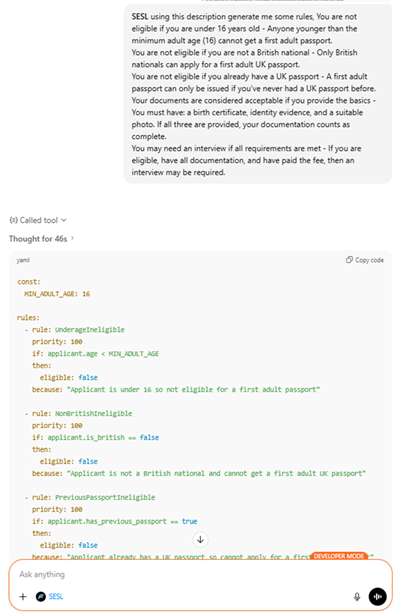
Generate rules
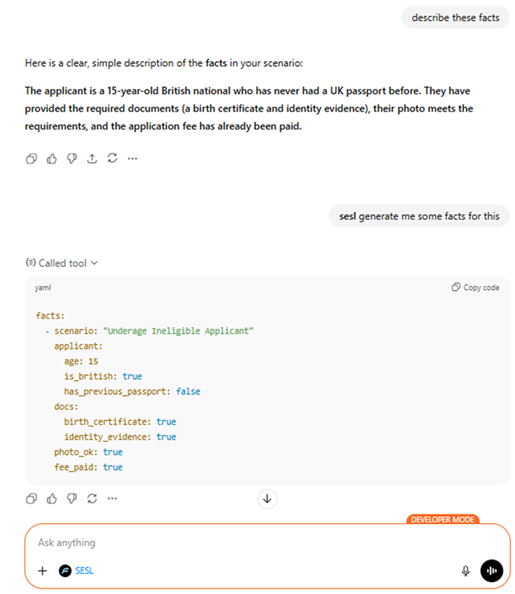
Build a scenario
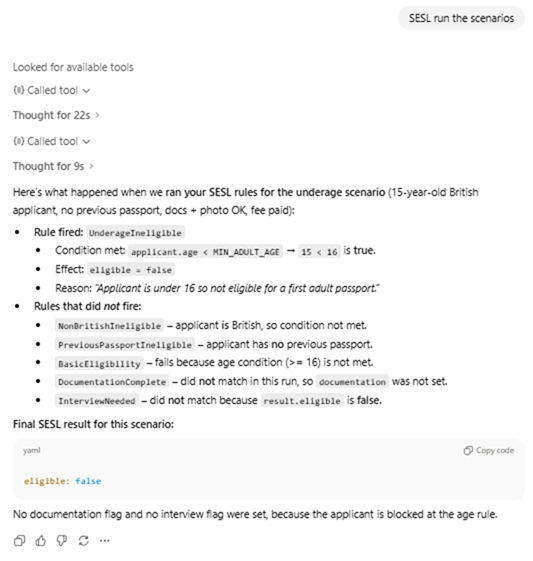
Evaluate results
Run SESL Locally
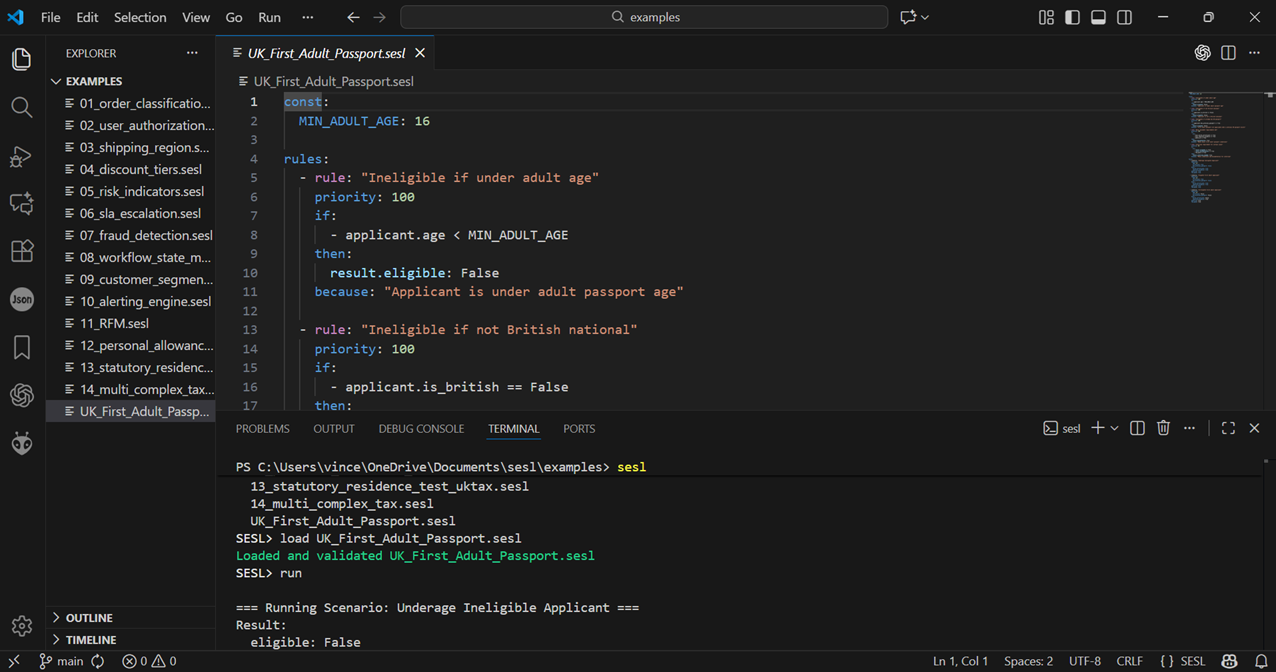
SESL runs natively on Windows, macOS, and Linux as a standalone executable. You can work with SESL models using the command-line interface (CLI) in online mode (interactive session with prompt, history, and multiline editing) or batch mode (non-interactive, scripted execution). Models are plain YAML files, so you can edit them in any text editor (VS Code, Sublime, Notepad++, vim) with syntax highlighting and version control (Git). The CLI provides commands for creating, loading, saving, editing, linting, graphing, and running models. Local execution means no network dependencies, no cloud costs, and full control over your data and logic.
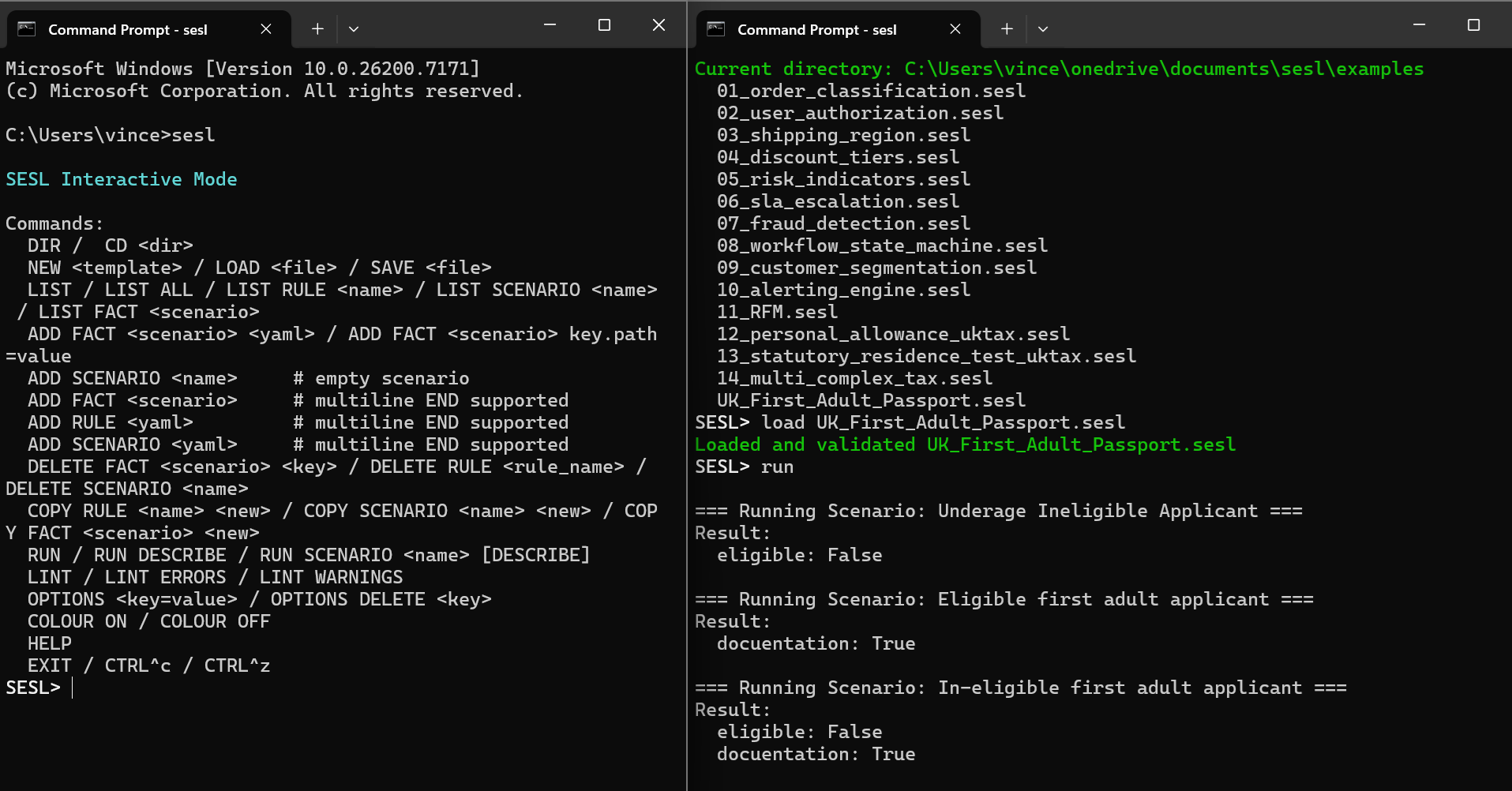
SESL Language
Structure of a SESL program
A SESL model is a structured YAML file that defines rules, facts (scenarios), and optional constants.
Providing a simple structure for allowing decision logic, inputs, and shared values to stay organised and easy to maintain.
The rules section contains each rule’s name, conditions (if), actions (then), optional LET formulas,
priorities, explanations, and an optional stop flag;
rules fire in priority order using forward-chaining so one rule’s output can influence another.
The facts section provides one or more scenarios—each with input data, an optional name, a result object
(where outputs are written), and automatically injected constants.
The constants section stores shared configuration values accessible to all rules.
Finally, all outputs are written into the scenario’s result object, which may also include engine metadata
such as starting facts, LET dumps, monitoring traces, and support tracking, keeping all conclusions and
debugging information in one place.
const:
  MIN_ADULT_AGE: 16

rules:

  - rule: check_age
    priority: 10
    if:
      - applicant.age < MIN_ADULT_AGE
    then:
      result.eligible: false
    because: "Applicant is under the required adult age."

  - rule: check_nationality
    priority: 20
    if:
      - applicant.nationality != "British"
    then:
      result.eligible: false
    because: "Applicant is not a British national."

  - rule: check_previous_passport
    priority: 30
    if:
      - applicant.has_previous_passport == true
    then:
      result.eligible: false
    because: "Applicant has already had a UK passport."

  - rule: verify_documents
    priority: 40
    if:
      all:
        - docs.birth_certificate == true
        - docs.identity_evidence == true
        - docs.photo_ok == true
    then:
      facts.docs_ok: true
    because: "All required documents are provided."

  - rule: final_decision
    priority: 100
    if:
      - facts.docs_ok == true
      - result.eligible != false
    then:
      result.eligible: true
    because: "All requirements satisfied."

facts:
  - name: Scenario1
    applicant:
      age: 22
      nationality: "British"
      has_previous_passport: false
    docs:
      birth_certificate: true
      identity_evidence: true
      photo_ok: true
In summary, a SESL model cleanly separates rule logic, scenario data, and shared constants while providing a dedicated result structure for outputs. This organisation makes SESL models easy to read, easy to test, and highly maintainable, while supporting powerful reasoning features like LET formulas, priority handling, and truth-maintenance tracking.
How SESL processes rules
The rules engine starts by loading the rules you wrote in YAML.
Each rule has conditions (the “IF”), actions (the “THEN”), optional LET formulas, and a priority.
The engine turns each rule’s conditions into a logic structure (like a tree of AND/OR/NOT blocks)
so it can evaluate them quickly and consistently.
LET expressions are also prepared in advance so the engine can compute temporary values for each rule during processing.
When the engine runs a scenario, it enters a loop that keeps applying rules until nothing changes anymore.
For each rule, the engine first calculates the LET values for that rule, then tests whether the rule’s conditions are true
using the current facts. If the conditions match, the rule is allowed to fire.
The engine also keeps track of which parts of the data changed so it doesn’t waste time re-evaluating conditions unnecessarily.
If a rule fires, the engine performs its actions—which means it writes new values into the scenario facts
(usually inside the result section). If a higher-priority rule has already written to the same output,
the lower-priority rule is skipped for that specific value.
The engine also uses a simple “truth maintenance system” to record which rules are supporting each result;
if a rule later stops being true, the results depending on that rule can automatically be removed.
The engine keeps looping through all rules until it reaches a stable state—meaning no rule changed anything
during that iteration. When this happens, it stops and returns the final results.
If a monitor is turned on, the engine also produces a step-by-step explanation showing which rules were evaluated,
which ones fired, which actions were taken, and why.
This makes it easy to understand exactly how the engine arrived at its final answer.
The engine uses a forward-chaining approach where it repeatedly applies rules to the current facts until no more changes occur,
gradually building up conclusions step by step.
Unlike a RETE engine—which builds an optimized network of condition nodes for extremely fast pattern-matching
across large rule sets—this engine uses a simpler but more transparent evaluation cycle:
each rule is checked in priority order, with dependency tracking to avoid unnecessary re-evaluation,
LET expressions for per-rule computed values, and a truth-maintenance system to ensure results remain logically consistent
when rules stop applying.
This design trades RETE’s heavy optimisation structures for clarity, easier debugging, and deterministic behaviour,
while still achieving efficient re-runs by only re-evaluating conditions linked to recently changed parts of the fact set.
SESL Online and Batch tools
The SESL tool can operate in two distinct execution styles—online mode and batch mode—each designed for a different workflow. Both modes use the same underlying SESL rule engine, but they differ in how users interact with models, how commands are processed, and whether the tool behaves conversationally or automatically. Understanding the difference between these two modes helps users choose the workflow best suited to development, debugging, automation, or testing.
Online Mode
In online mode, the SESL tool enters a fully interactive environment where the user types commands one at a time and receives immediate feedback. This mode is designed for hands-on exploration: you can load or create models, edit rules and scenarios, inspect their contents, and run inference repeatedly as you iterate. Online mode also includes conveniences like tab-completion, colorized output, option substitution, and confirmation prompts. It behaves like a live workspace where the model evolves continuously based on user input.
Example (starting online mode):
$ sesl --online
SESL> LOAD my_model.sesl
SESL> LIST
SESL> RUN DESCRIBE
During interactive execution, online mode supports rich debugging tools. Running scenarios with
RUN DESCRIBE reveals the rule-firing trace, detailed summaries,
support structures, and explanations of the final results. Errors are surfaced immediately, and because the session
preserves the model in memory, users can fix issues and retry quickly. This makes online mode ideal for building,
experimenting with, and refining SESL models.
Example (editing and re-running a scenario interactively):
SESL> ADD FACT DemoScenario temperature=15
SESL> RUN SCENARIO DemoScenario DESCRIBE
SESL> DELETE FACT DemoScenario temperature
SESL> RUN
Batch Mode
In contrast, batch mode is completely non-interactive. It executes a sequence of SESL commands automatically,
with all confirmations answered “yes” behind the scenes. Commands are provided as a single
--batch string, which may contain multiple semicolon-separated instructions.
Batch mode is built for automation—running tests, transforming models, validating files, or processing SESL logic inside scripts
or pipelines.
Example (batch mode with multiple commands):
$ sesl model.sesl --batch "LIST; RUN; LINT ERRORS"
Batch mode’s behavior is entirely deterministic: it never pauses for input, never asks questions, and only prints the results of executing the commands. It can load a file at the start or begin with an empty model. This makes it well suited for CI systems, automated workflows, regression testing, and other scenarios where SESL logic must run unattended. While online mode is optimized for interactive editing and debugging, batch mode is optimized for repeatable and scripted execution.
Example (batch mode used in automation):
$ sesl --batch "NEW; ADD RULE myrule: {...}; SAVE out.sesl"
SESL Linter
The SESL Linter performs static analysis on your SESL models to detect mistakes before you run them. It inspects rules, conditions, LET expressions, constants, and scenarios to catch structural issues, missing references, impossible conditions, and unused fields. This ensures your SESL model is clean, correct, and predictable before it reaches execution.
The linter checks for a wide range of issues, including:
- Unknown fact or result paths referenced in conditions
- Unknown
CONSTreferences or LET dependencies - Impossible or invalid rule conditions
- Rules that never fire (dead rules)
- Unused constants or unused scenario fields
- Conflicting rules writing to the same
resultpath - Duplicate rule names
- Empty scenarios or scenarios with never-read facts
- LET expressions with invalid syntax or obvious runtime errors (e.g., divide by zero)
These rules come directly from the SESL linter core, ensuring strict consistency with SESL’s execution semantics. The linter enforces strict identifier rules, requiring that unquoted tokens in conditions and actions refer to known facts, LET names, result fields, or constants. This prevents subtle runtime bugs caused by typos or missing quotes. :contentReference[oaicite:2]{index=2}
Example (run the linter):
$ sesl model.sesl --batch "LINT ERRORS"
Rule Dependency Graph
SESL can generate a visual GraphViz dependency graph showing how rules relate to each other. This graph helps you understand the flow of logic: which rules depend on which facts, which rules produce results that other rules consume, and how data moves through your SESL model.
The graph generator reads every rule's conditions, LET expressions, and result writes to build a map of:
- Rule → Fact dependencies
- Rule → Rule dependencies via
result.xreads - Fact nodes referenced by conditions
- Priority-based color coding for rules
Each rule is displayed as a rectangular node, colored based on its priority, while facts become oval nodes. Edges between rules reveal how data flows and where dependencies exist. The result is a clear, visual way to see the structure of your rule system—especially useful for large models with many interacting rules. :contentReference[oaicite:3]{index=3}
Example (generate a graph):
$ sesl model.sesl --batch "GRAPH DEPENDENCIES > graph.dot"
$ dot -Tpng graph.dot -o graph.png